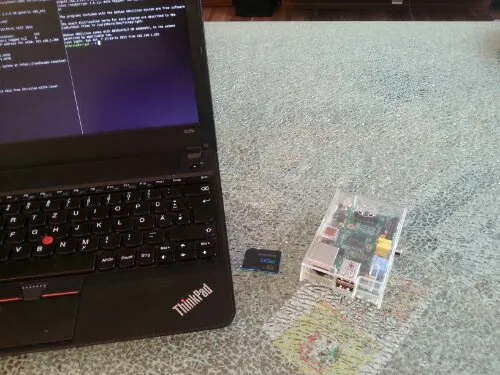
I just can’t help myself: I have to geek out from time to time. And no, by geeking out I don’t mean reading comics or watching Star Wars. I mean BUILDING SOMETHING that is related to technology and, well, that is utterly useless most of the time ;) Here’s a video I made about my newest projects: pilight and pimorse.

Video: PIMORSE

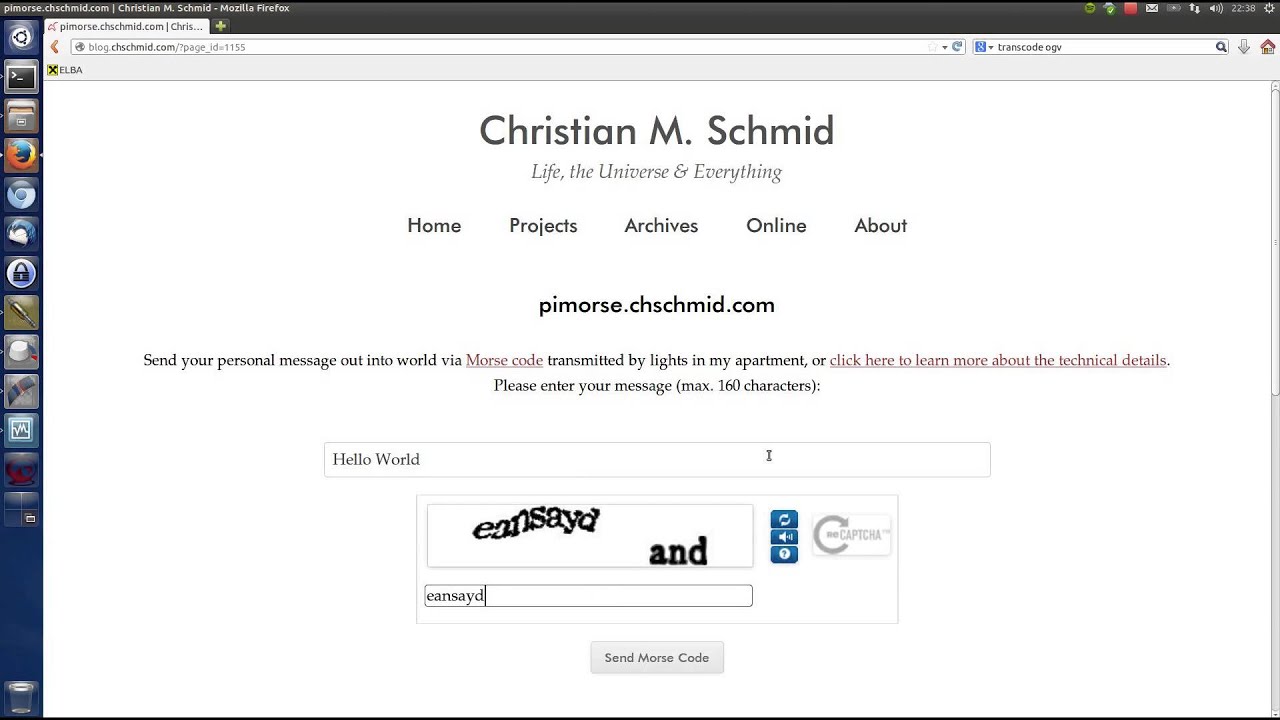
pilight and pimorse let me control the lights in my apartment + they let you and everybody else in the world send out their personal messages in Morse code via the lights in my apartment!

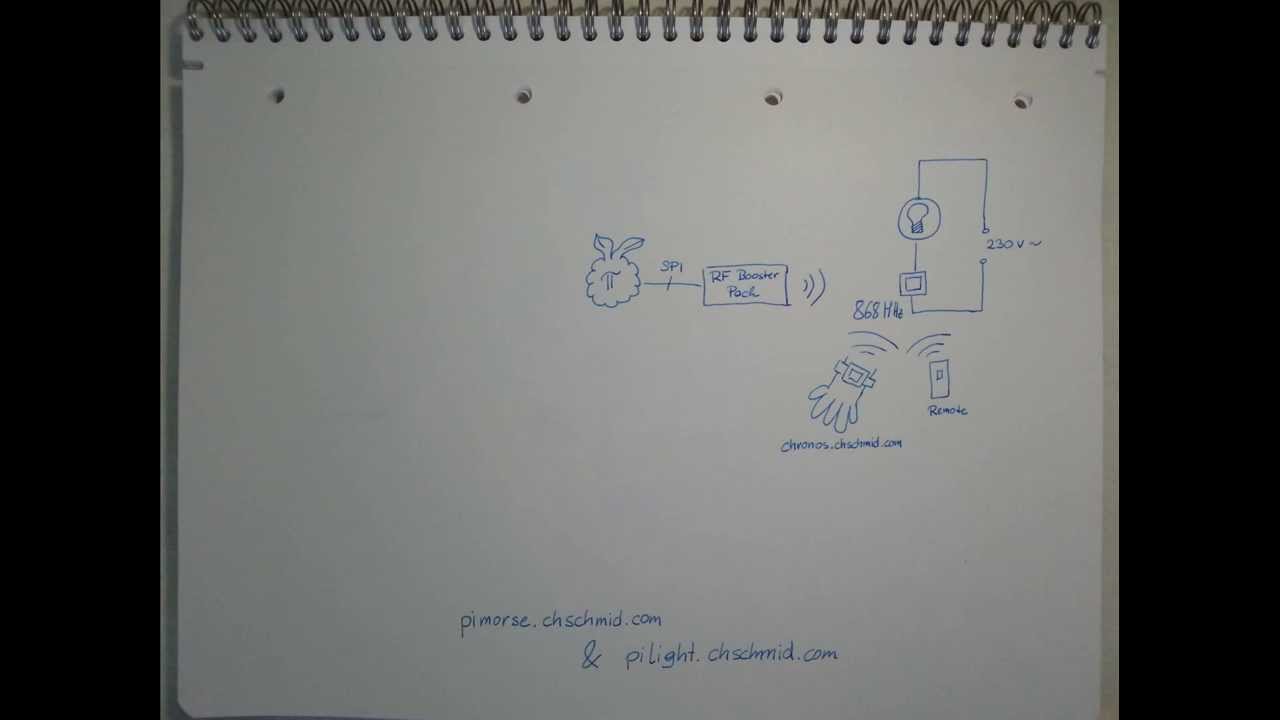
Technically pilight and pimorse are centered around a Raspberry PI, which is connected to an 868-MHz radio via SPI and to my local network + the Internet. The 868 MHz signals control the three dimmer switches in my apartment. But enough of the tech talk, let’s send some stuff out into the world at http://pimorse.chschmid.com.

Read more →

The PI

· DIY, Music


I’ve composed some background music for a youtube video on my pimorse / pilight project. At some points I’ve tried to let the music reinforce the video and the spoken words.

Click here to download the sheet music.

Video / Audio

Video: PIMORSE

This work by Christian M. Schmid is licensed under a Creative Commons Attribution 3.0 Austria.

Read more →

I am really not exactly sure how it could happen, that I haven’t signed up to Spotify earlier. For 10 € per month they let me stream almost 90% of all the music I’ve ever wanted to hear + I can store music on my mobile for offline use for 30 days. - All of this in 320kbps vorbis quality (= very good)

Spotify

This almost sounds too good to be true: I am aware that there might be problems such as bad compensation for musicians, the possibility that the service might stop some day and that there will be nothing tangible that I will be left with when that moment comes, but the great time I’ve had listening to awesome music.

We are all left to wonder what the future of the music business will bring. Still I believe that this kind of service is the future some way or other.

How do you access your music? CDs from your local store, CDs via amazon or ebay, an online service such as Spotify, sharing with friends, FM or internet radio or - heaven forbid - illegal downloads?

Whatever it is: the most important thing is to not forget to go to concerts and listen to whatever music gets you in the mood: LIVE!

Read more →

From time to time I just can’t resist: My website / blog (whatever it is) has to change. The time has come again and the result is what you are looking at right now. This recent facelift triggered me to dig through my personal archives and old back-ups to take a look at the long way my website(s) has / have come. And truly a long way it is.

1999 - My First Lines of HTML

I found out that I wrote my first couple of HTML and JavaScript lines in 1999, a time when everybody was still using Netscape Navigator to browse the web and Altavista to google - obviously nobody called it “to google” at the time. I had no idea how to use computer graphics software, but paintbrush and my 56k modem - yep one of those that made the funny noises - was all I needed to upload my first piece of HTML art.

1999

Well, lots of typos and not exactly art. Fun fact: I used Labview to generate the buttons. By the way this is the only thing that I’ve ever found Labview to be useful for.

2000 - Flash and HTML

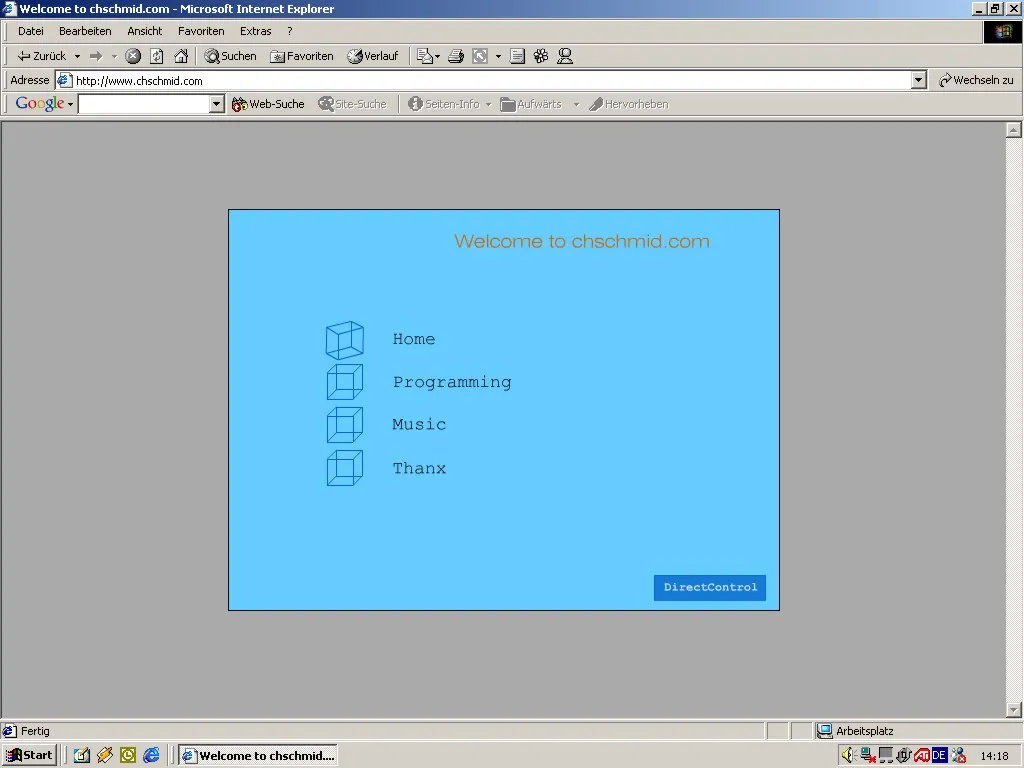
The next thing I discovered was a soon-to-be-dead technology known as Flash, which I used to create Version 2.0 of my personal website in 2000.

2000.1

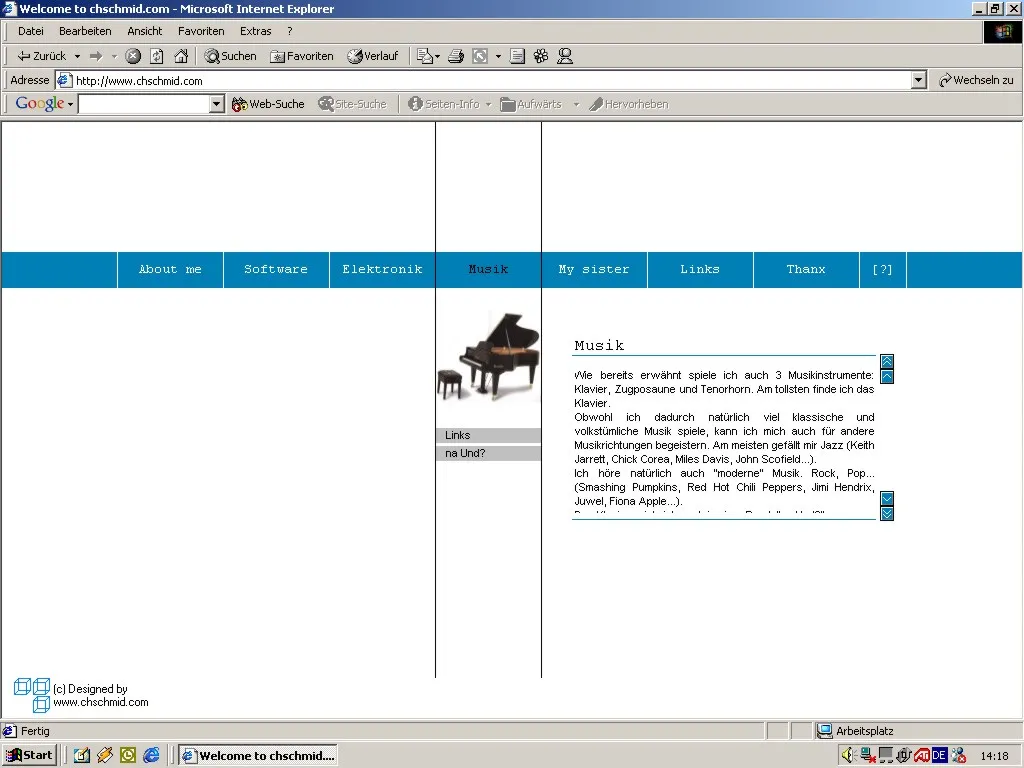
Please note the cubes, which would stick with me for a couple of years. I did also get my own domain www.chschmid.com around that time. It was a free offer, all you had to accept was ads on your website, which I of course was able to hide via JavaScript. As not every computer supported Flash I also continued with HTML in parallel. The interesting aspect about HTML based websites is that you can always look at the source code. So what I did is I just copy-and-pasted an interesting design that I had found online and modified it to my needs. Yes this is stealing, but I just did not care at the time.

2000.2

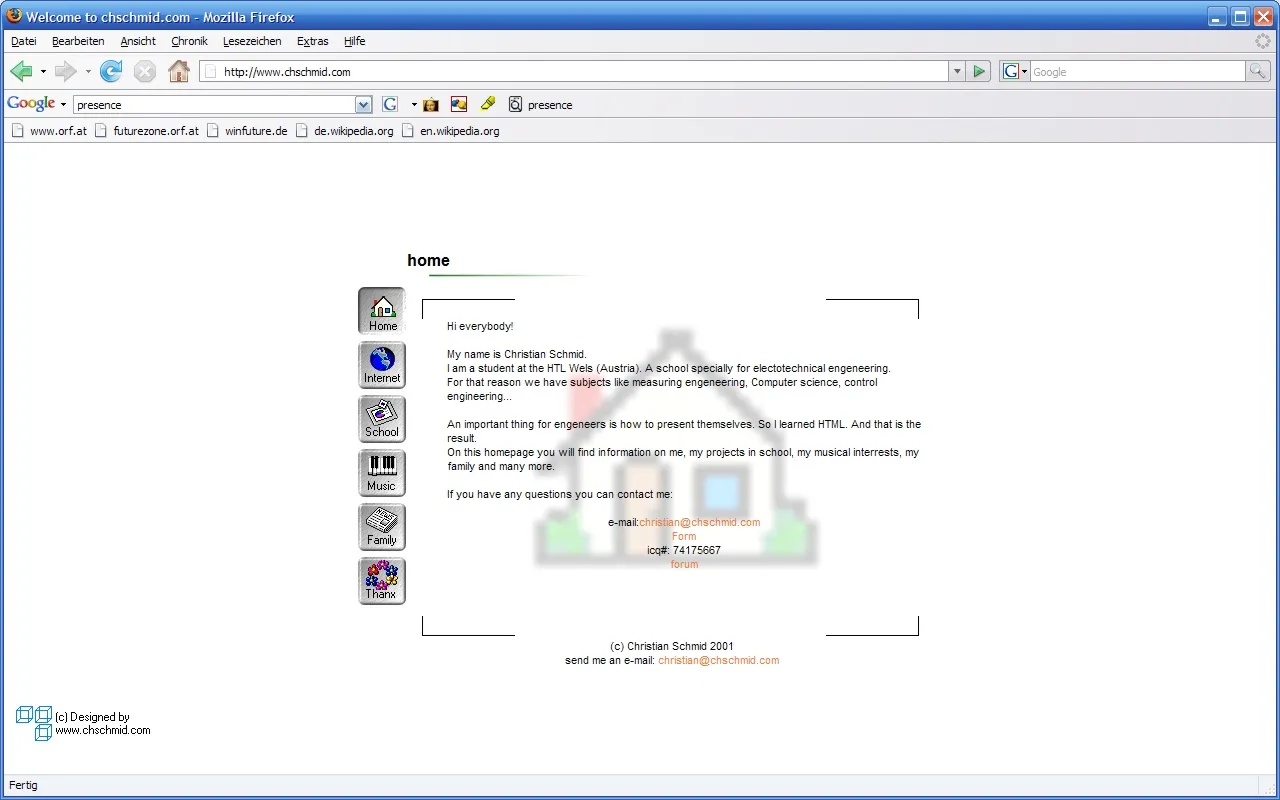
Until the time came that I did care and so I designed a new website in 2001.

2001 - HTML Design

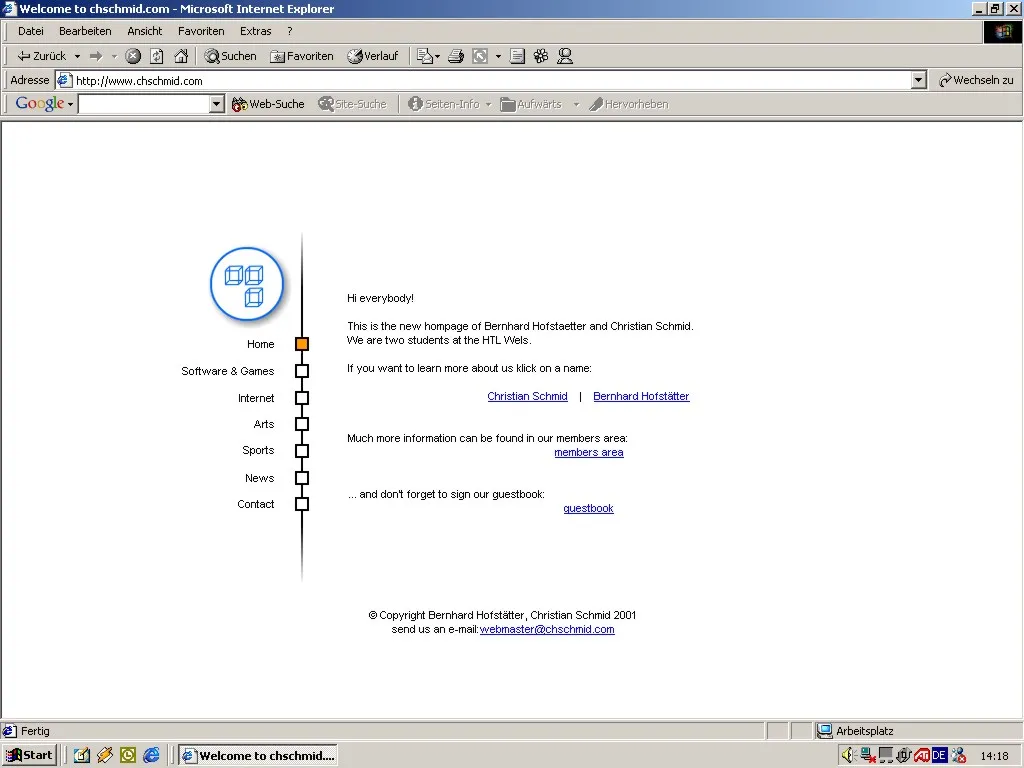
This actually was the first time that I did really design something in HTML. I had learned how to use the Corel Graphics Suite by then and the design was centered around icons and styles that remind me very much of the icon design language of the 90s.

2001.1

In the same year I did try to set up a website as joint project with a very good friend of mine. He’s doing a lot of photography these days.

2001: A joint project

2001/2002 - The Rise of PHP

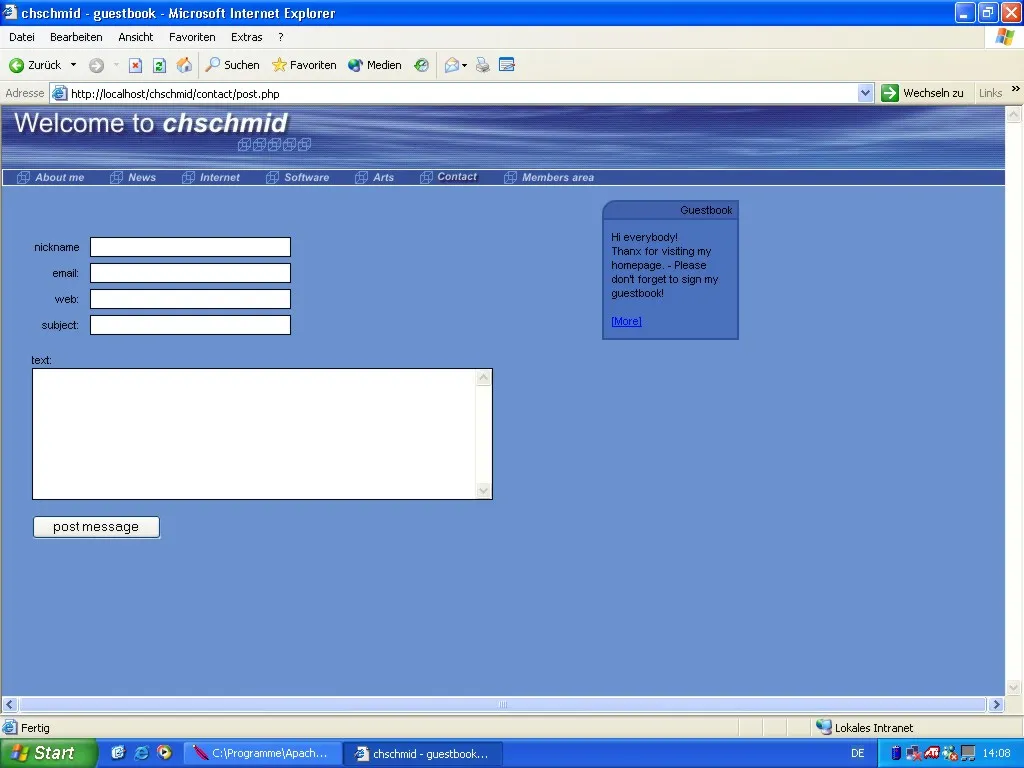
In 2001/2002 I started using PHP and MySQL as server-side technologies to enhance my website. All of my PHP scripts were home-grown and for applications such as guestbooks and calendars. At the same time I also started to work for Fronius as web developer. Looking back it is funny to see how little I knew, and how much that was worth at a time, when it was common knowledge that the Internet is THE big thing yet virtually none of the 35+ knew much about the technologies behind it. So here’s my design from 2001/2002.

2002

There are some note-worthy aspects about this screenshot. First it shows that I ran Windows XP, second I was using IE (Ah!!!), third and most importantly: From the URL and the taskbar one can see that I had Apache running on my local machine for developing PHP scripts.

2002-2006 - PHP Nuke

In 2002 I found out that there were online communities that developed PHP Content Management Systems. Looking back I made a very bad choice and started using php-nuke. I did also code some modules for the system.

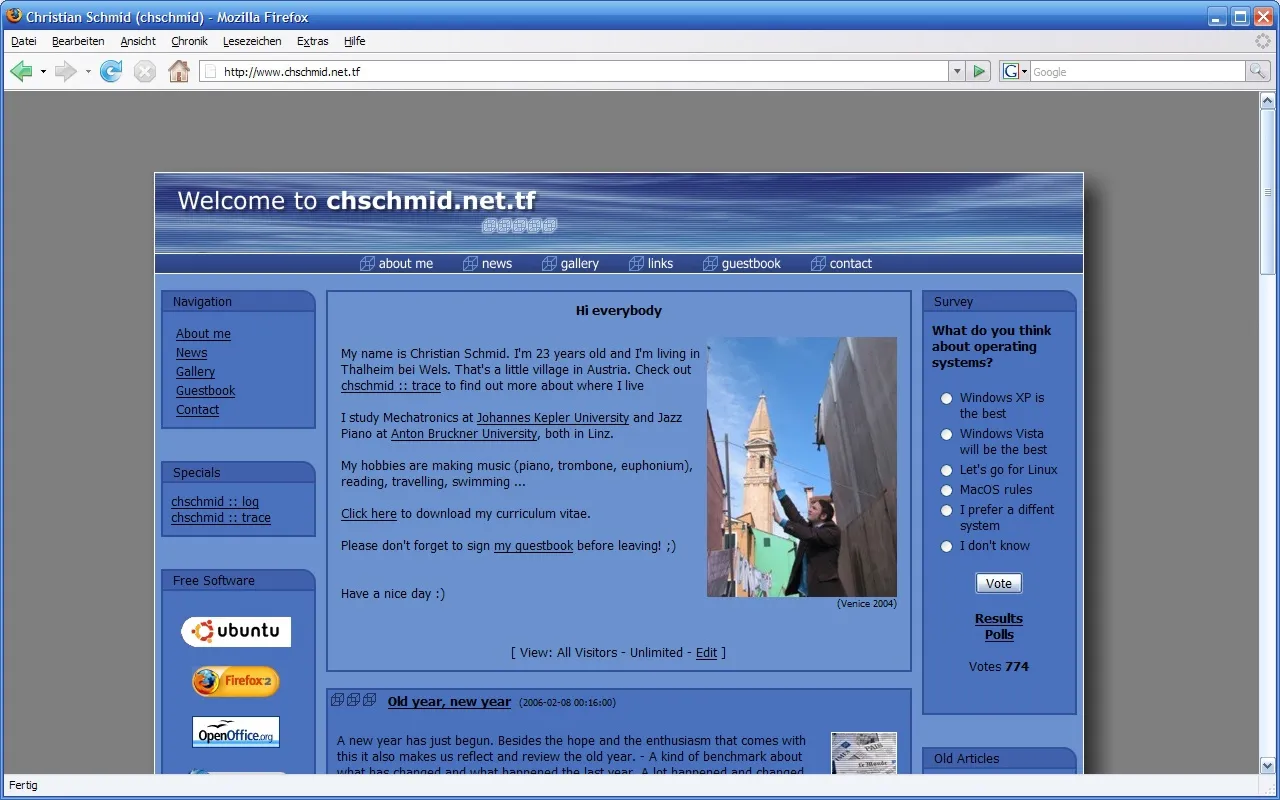
2006

I think some time in 2003 the free domain offer expired, and I began using www.chschmid.net.tf instead of www.chschmid.com. From then on I was also forced to be aware of CSS, which I had tried to avoid whenever possible. Interestingly this had worked quite well for a long time! In 2006 I did a minor facelift to account for the facts that screen resolutions were getting higher and that font rendering and anti-aliasing technologies had advanced. At the same time php-nuke had some serious security vulnerabilities and I found that the framework was more than I actually needed.

2006-2008 - HTML + PHP

So I did another redesign, again with almost static HTML and some home-brewed PHP + I did improve the design to be more photo-centric in 2007.

2007-2009

I didn’t change content regularly but uploaded all my music gigs.

2008+ - Wordpress

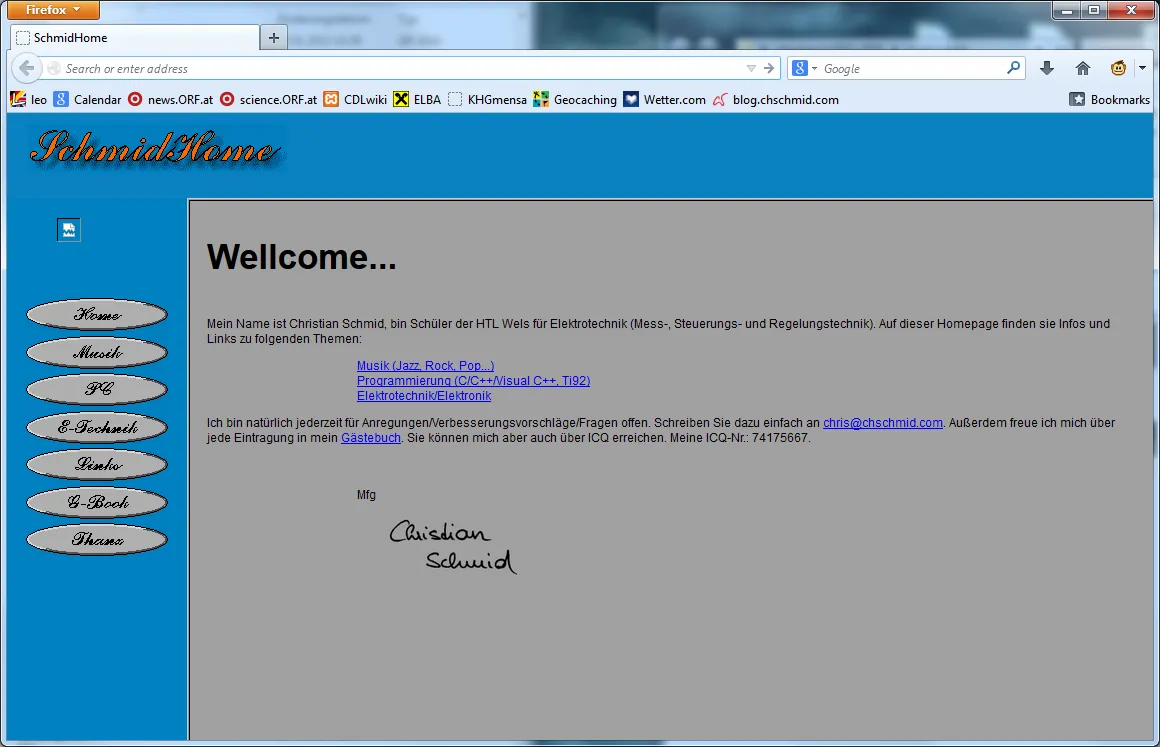
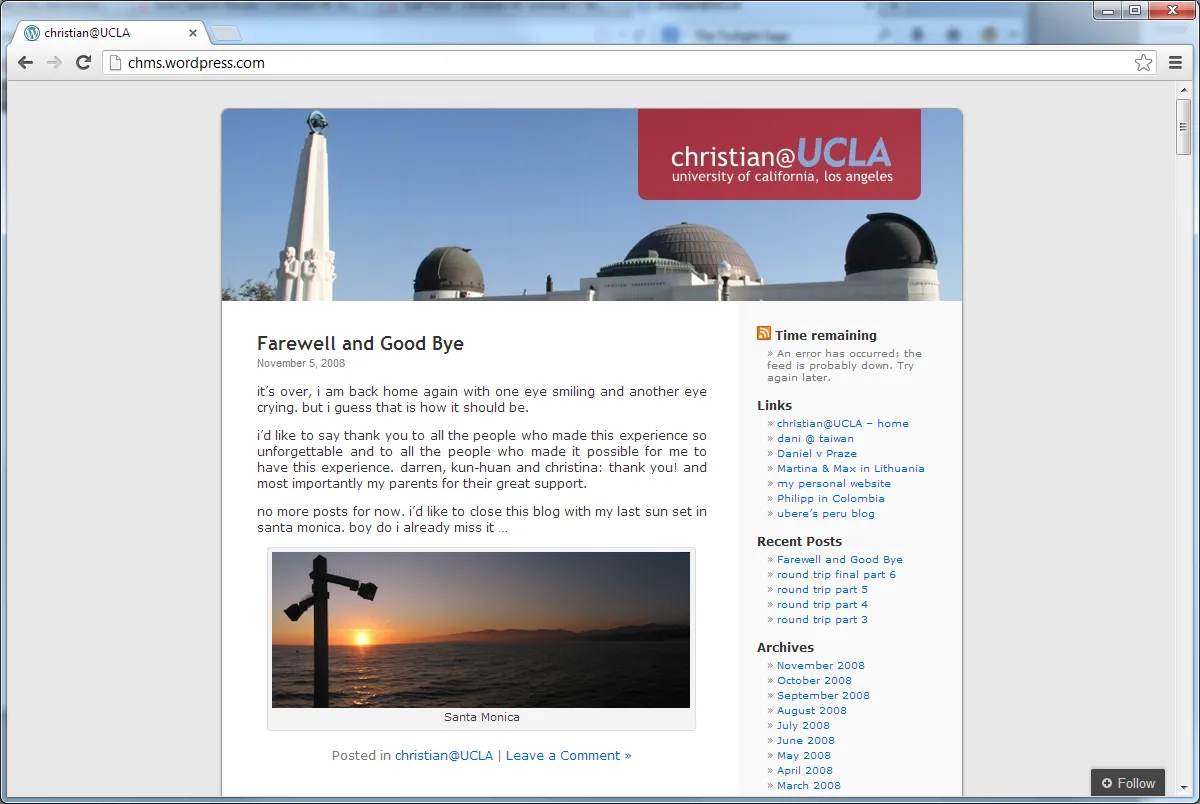
When I went to UCLA in 2008 I needed a more flexible system for pushing information online regularly. With lots of exams and the bureaucracy of going to the US at hand I didn’t have too much time to set up the whole thing, so I went with a blog hosted at wordpress.com and minor default template modifications: chms.wordpress.com.

2008

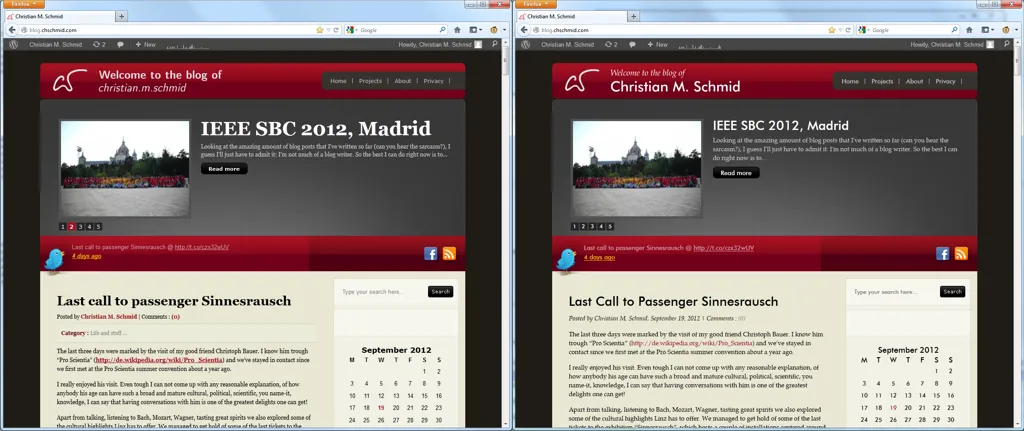
I did get back “my domain” in 2009 and set up a self-hosted wordpress blog in 2010. I again used a pre-defined wordpress template with some individual modifications. Actually I did come to the decision that I wanted a new blog while on a plane from Hawaii to LA and set the whole thing up during my first night in LA. - You gotta fight jet lag somehow, right. In 2012 I did read and play around a lot with fonts, and so some font changes became inevitable.

2010-2012

What is interesting to see in all screenshots from 2006-2013 is that fonts have become more important, more beautiful and that there were a lot of pseudo-realistic design elements: Textures, shadows, lots of boxes - something that more and more designers are avoiding these days, e.g., if you think about the iOS 7 resign, or the bold and beautiful move that Microsoft has made with Windows Phone 7 and Windows 8 a few years back.

2013 - The Time is Now

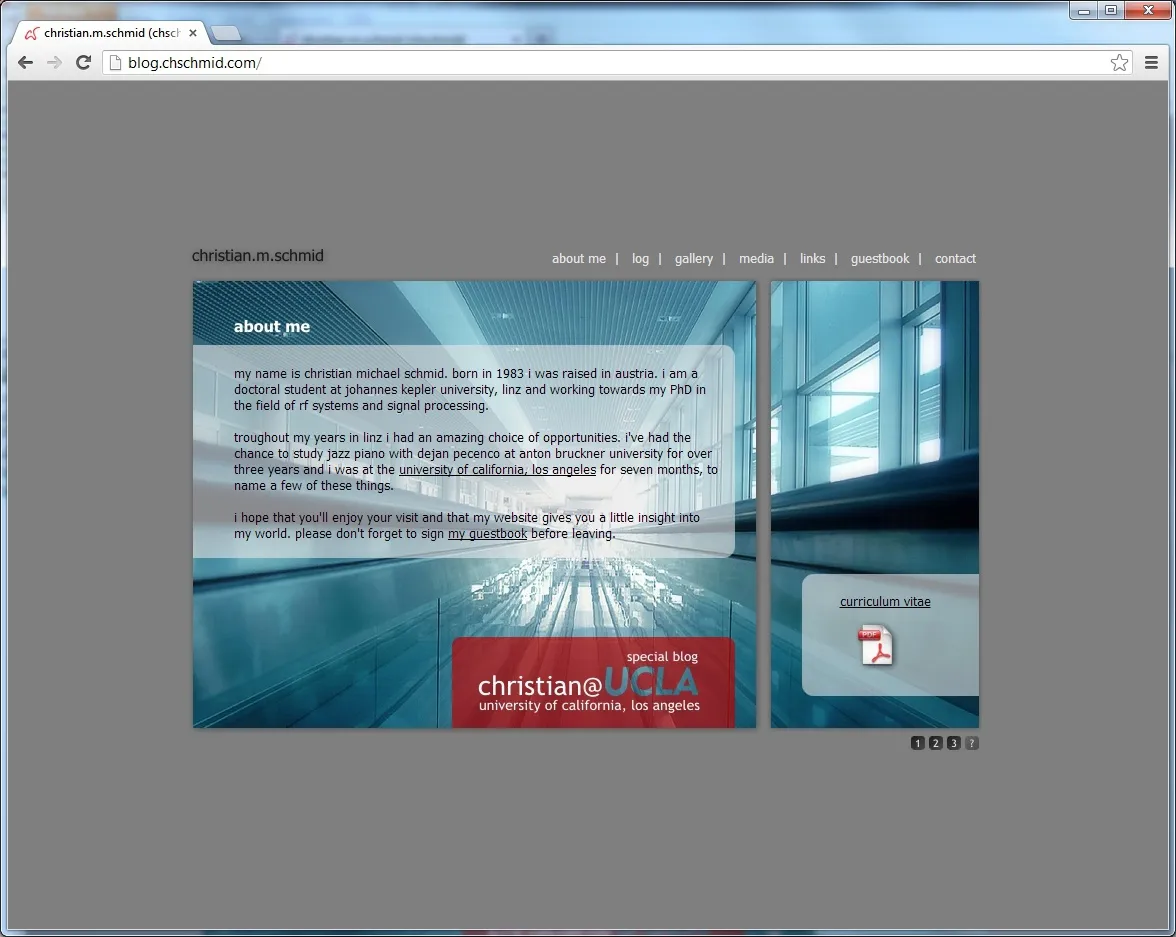
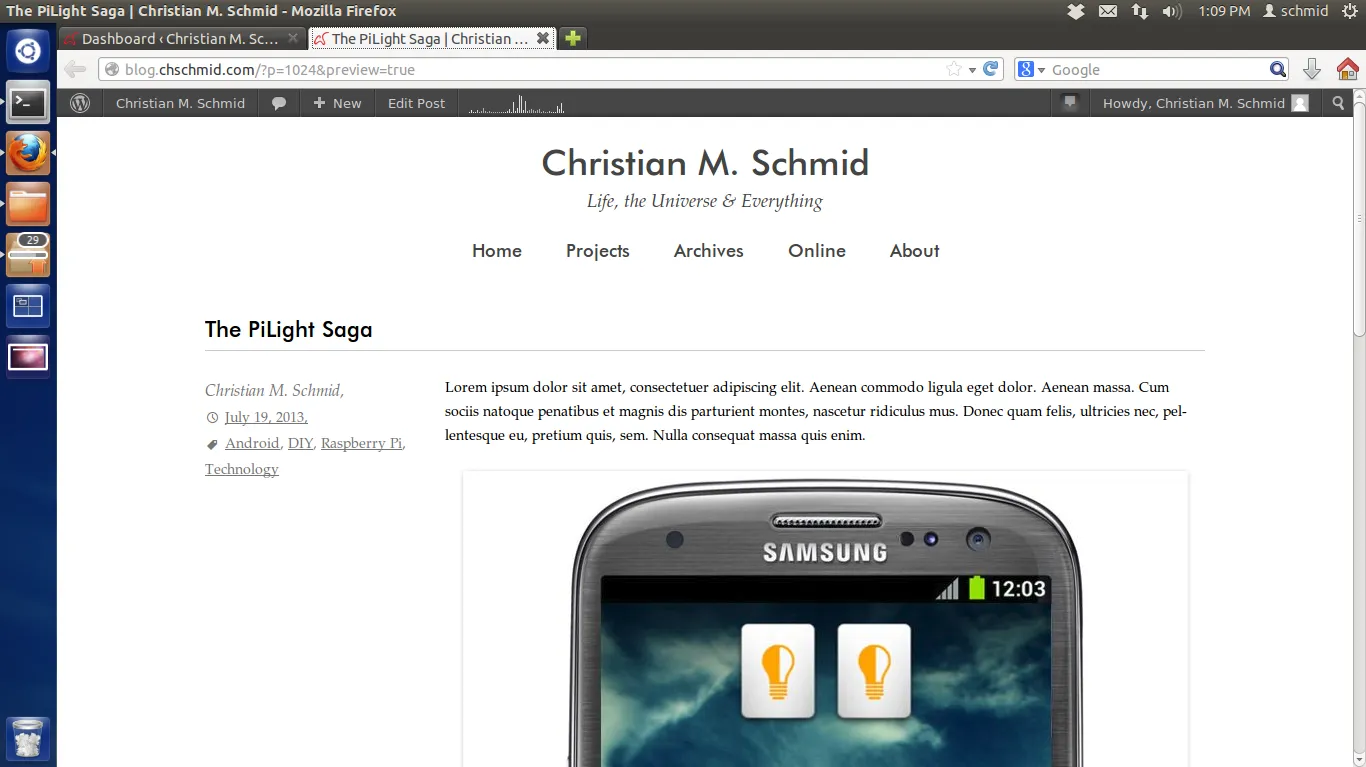
This brings me to what you have in front of you today: A novel, minimalistic, content-centered approach. It’s a new theme for the same self-hosted wordpress system, that I have been using since 2010 (with all the latest updates of course)

2013

And so here come the most important questions: What do you think about it? What would you change? And maybe: What’s your personal Web story? PS. My template can of course be downloaded from my github site.

Read more →

PiLight


My Raspberry Pi lets me and everybody else control my bedroom light from virtually anywhere in the world. But lets start with a video on what everybody can do with pilight.

Video: PIMORSE

Table of Contents

1. Introduction
1.1 The Story Behind This Project
1.2 The Hardware
1.3 A Schematic Block Diagram
2. PI <-> 868 MHz
2.1 The Physical Connection
2.2 The SPI Commands
2.3 PI Prerequisites
2.4 Programming the PI
3. pilight: WiFi <-> PI
3.1 The Android Widget
4. pimorse: Web <-> PI
5. Source Code and Installation
6. Summary

1. Introduction

1.1 The Story Behind the Project

I installed a dimmer switch in my bedroom a couple of years ago, which can be controlled via a remote control that operates in the 868 MHz band. Also a couple of years ago I reverse engineered the protocol and implemented it on my TI Chronos watch.

In this little weekend project I hooked up a Raspberry Pi (RPi) with a CC110L RF BoosterPack via SPI. With the RPi being connected to a WiFi router and to the world wide web via a server this lets me and everybody else control my bedroom light from virtually anywhere.

What I do like most about this project is that it covers so many layers of abstraction: From rather high level Android programming, a WordPress template (CSS, PHP, reCAPTCHA), to PHP scripts on my LAMP server, to a “proprietary” TCP/IP socket connection + code on a RPi, to actual SPI voltage signals on 4 wires, to register settings and a 64 byte FIFO in a low-level RF transceiver and finally to 868 MHz signals.

1.2 The Hardware

This project combines

1.3. Schematic Block Diagram

Here’s a video explaining the basic building blocks of my system:

Video: PiLight

As in the video, let’s take a look at the whole thing bottom-up.

2. PI <-> 868 MHz

The CC110L RF Booster Pack has to be talked to via an interface called Serial Peripheral Interface (SPI). My guess is that there are almost no computers where there is no SPI interface at least somewhere. Still SPI interfaces are usually not read/write-able from applications, as they are just too “low-level”. The RPi is different. It has SPI-pins + there is a kernel module to use those pins from an application.

2.1 The Physical Connection

To get started one has to connect the VCC, GND, MISO, MOSI, CLK, and CS pins of the RPi and the RF Booster Pack. Here’s the pin layout of both.
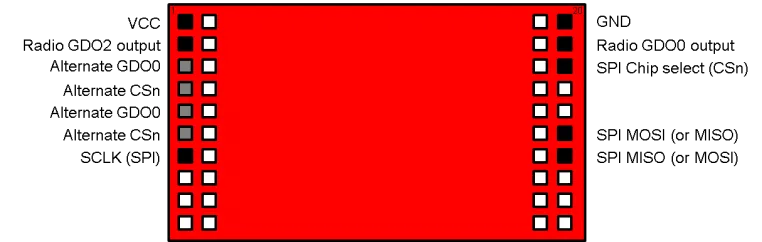
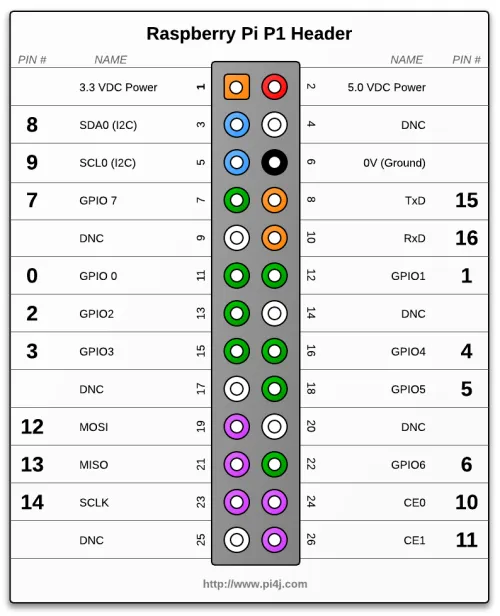
Pin layout of the CC110L RF BoosterPack Pin layout of the Raspberry Pi P1 header

Make sure you connect

VCC <-> 3.3 VDC Power
GND <-> 0V (GND)
SCLK (SPI) <-> SCLK
SPI MOSI <-> TxD
SPI MISO <-> RxD
CSn <-> CE0

This is what it looks like in my case:
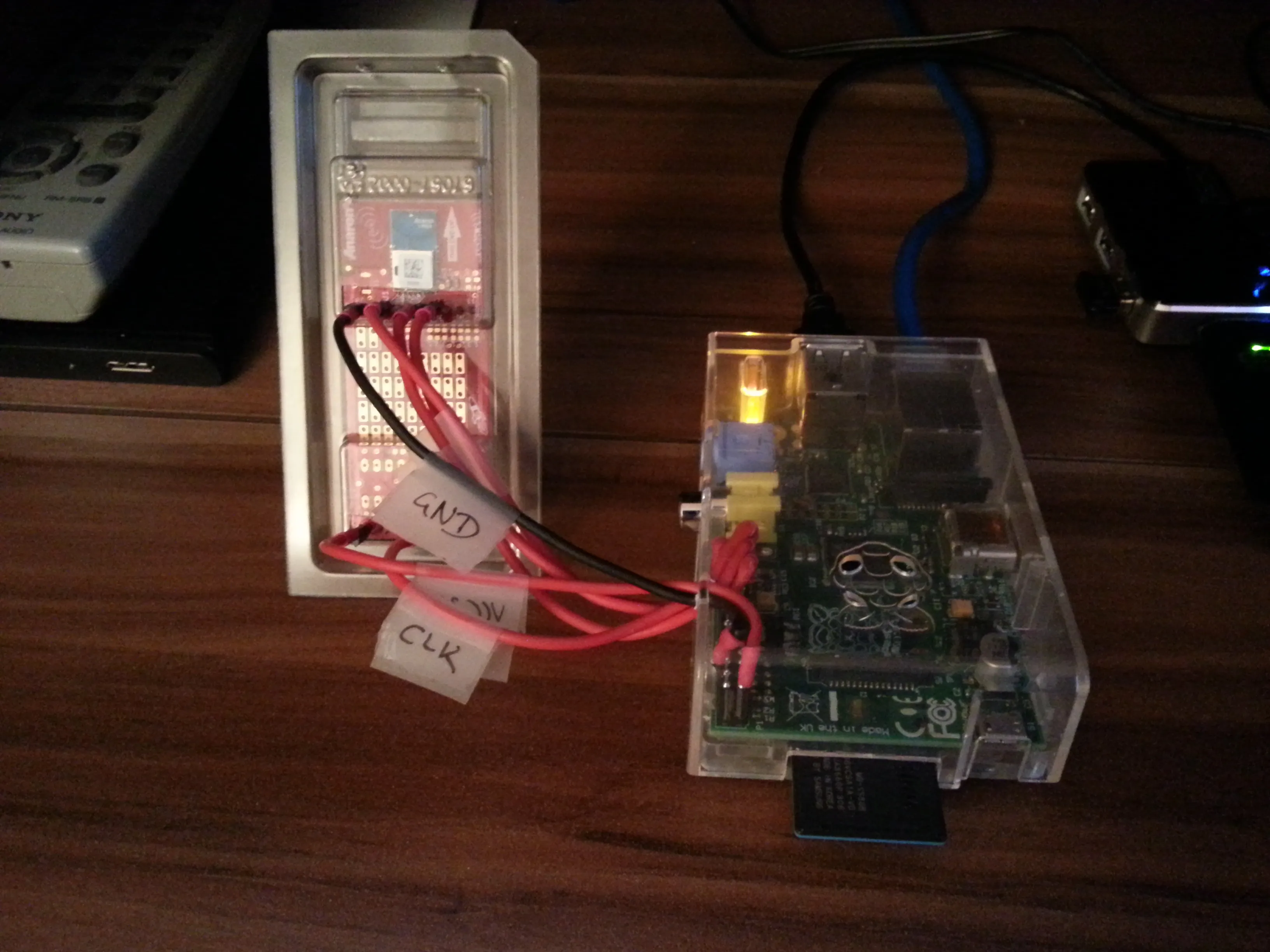
The Raspberry Pi wired to the CC110L RF BoosterPack, with labeled GND and CLK wires

2.2 The SPI Commands

After you’ve established the physical connection you have to figure out what to SPI commands to send. The key here are TI’s RF studio and the CC110L datasheet. This is non-trivial, but in the end you’ll figure out what commands you’ll have to send via SPI to produce the same 868 MHz signals that the remote would produce. (By the way this was the most time-consuming part of the project)

2.3 PI Prerequisites

Ok now that the physical connection is established and now that you know what to send it’s time to let the PI actually do it. My RPi runs on Raspbian, so some of the things might be different for you if you use another Linux distribution. Here’s what you’ll need to do on a Raspbian system.

  1. First of all you’ll need to load the required kernel module on start-up by adding the line “spi-bcm2708” to your /etc/modules file. After adding this line you can either reboot or load the module manually via “sudo modprobe spi-bcm2708”.
  2. By default only the root user is allowed to use the SPI interface. It really depends on which user you want to run the server. If you run it as super user (= not recommended) your done already. But if you want to run it as your standard user create a file “/etc/udev/rules.d/50-spi.rules” with the following content SUBSYSTEM==”spidev”, GROUP=”spi” and add your standard user to the group SPI. Again reboot or restart your udev deamon.
  3. This is not SPI specific, but as the server is written in Java you’ll need to install a Java Runtime environment. E.g., via “sudo apt-get install openjdk-7-jre”

To check if everything works properly after you rebooted your machine, run “ls -al /dev/ | grep spi” which should give you something like

crw-rw---T  1 root spi     153,   0 Aug 18 00:31 spidev0.0
crw-rw---T  1 root spi     153,   1 Aug 18 00:31 spidev0.1

and ” java -version” should show something like

java version "1.7.0_07"
OpenJDK Runtime Environment (IcedTea7 2.3.2) (7u7-2.3.2a-1+rpi1)
OpenJDK Zero VM (build 22.0-b10, mixed mode)

2.4 Programming the PI

The program to run on the PI has to be able to write to the SPI and to listen to a TCP/IP port for incoming messages, which is something you can do in practically any programming language. With my limited programming experience it basically comes down to a choice of C/C++, Matlab, Java and Matlab. I decided to go with Java. I used the PI4J library to do the SPI stuff and the netty.io library for the networking stuff.

3. pilight: WiFi <-> PI

OK, I’ve already spoiled everything, I used Java and the netty.io libary to listen to commands from the network. – And I connected the PI to a router, which I configured so that it assigns a static local IP to the PI.

The java program I wrote actually creates two servers. One for commands to turn the lights on / off and for dimming the light (port 22041), and another one for processing morse codes (port 22042). Port 22041 is used from my Android app, and Port 22042 is used for everyone from the WWW.

3.1 The Android Widget

The server on the PI listening to port 22041 is for direct on/off/dimming commands. I wrote a simple Android widget that connects to this port and sends the required commands. As the widget tries to connect to the local address (which is fixed in the router settings) the Android widget only works when the device is connected to my home network. (Of course tunnelling via SSH is always an option ;)

4. pimorse: Web <-> PI

My router is configured to route traffic from the web through ports 22, 80 and 443 to an x86 server on my network. I just did not want to expose the PI to the web directly.

The server is an x86 machine running Ubuntu 12.04 and the full LAMP experience. I wrote a PHP script for it that translates plain text to morse-code which is then forwarded to the PI on the local network, port 22042.

Give it a try at http://pimorse.chschmid.com/ to send your personal message out into the world via Morse code.

5. Source Code and Installation

The source code is available on github/chms/pilight. Basically there are three components

  • pilight-server: The java software running on the PI;
  • pilight-android-client: The Android client;
  • pimorse: PHP scripts for your Webserver.

All components come with a readme file that details how the components can be installed. pilight-server comes with an installer script.

6. Summary

Again one of my favorite aspects about this project is that it involves so many different levels, and was still doable in a couple of days.

However apart from the personal joy that it gave me, it also got me thinking: If this is doable for me in less than 100 hours, why don’t we have the Internet of Things (IoT) already? I really don’t know. What I do know is that there are a few inherent security flaws in my system that are probably present in practically all of today’s sensor networks. E.g. anyone who knows the 868 MHz code of my remote, could simply walk up to my apartment and start toggling my bedroom light.

For all that I know it looks like the power requirements that we have on the IoT require serious trade-offs, which probably quite often effect robustness and security. Just two examples: in a presentation that I heard last week it was mentioned that Contiki, the most prominent OS for IoT applications, does not support rings and works with cooperative multi-tasking.

I am really not an expert, but the solution to the IoT seems non-trivial. I am curious, suspicious and excited what will come next and I hope so are you!

Please let me know what you think about this project and don’t forget to have a little fun with your RPi as well! After all that’s what it was made for!
Read more →

I am not going to waste too many words this time, instead I am just posting the commands required to get squeezeslave run as deamon on a Raspbian Raspberry Pi.

  1. Download and untar latest Squeezslave for your Raspberry from https://code.google.com/p/squeezeslave/. As of today this can be done via

    wget https://squeezeslave.googlecode.com/files/squeezeslave-1.3-390-armhf-lnx32.tar.gz
    tar -zxvf squeezeslave-1.3-390-armhf-lnx32.tar.gz
  2. Move everything into the right places

    sudo mkdir /usr/local/squeezeslave
    sudo mv squeezeslave /usr/local/squeezeslave
    sudo chown root:root /usr/local/squeezeslave/squeezeslave
    sudo ln -s /usr/local/squeezeslave/squeezeslave /usr/local/bin/squeezeslave

    From here on you should already be able to run squeezeslave via

    squeezeslave -o 0 YOURSERVER
  3. To run squeezeslave as a deamon and at the system start you’ll need to add this file and get it to the right place.

    wget https://blog.chschmid.com/media/squeezeslave
    sudo mv squeezeslave /etc/init.d
    sudo chown root:root /etc/init.d/squeezeslave
    sudo chmod 755 /etc/init.d/squeezeslave
    sudo update-rc.d squeezeslave defaults
  4. Now all that is left is to create a config file

    sudo joe /etc/default/squeezeslave

    with the following content:

    SSMAC="xx:xx:xx:xx:xx:xx"
    SBSHOST= YOURSERVER
    SSOPTIONS="-o 0"

    Obviously you want to configure it to work with your server and add the MAC address which you find under HWaddr using

    ifconfig
  5. You can now either reboot your machine or start the service manually

    sudo service squeezeslave start

Another problem is that the Raspbian by default boots at a rather low audio volume. This can be fixed by

  1. setting the volume with the command line mixer

    sudo apt-get install alsa-utils
    alsamixer
  2. and storing the settings

    sudo alsactl store
Read more →

Sorry to disappoint some of you: This is not about the great movie that I watched on an airplane on my way to Seattle just recently. This post is about my newest gadget. I just could not resist getting myself a Raspberry Pi, which is a low power (low power as in low electrical power but also as in low computational power) credit-card-sized single-board ARM computer. Meet my new toy:

wpid-20130707_184802.jpg

I did also buy

  • a transparent case,
  • an 8GB SD card,
  • and a micro USB charger as power supply.

If you order all of this stuff online you should be able to get it for around 50-60 €. - When it comes to the Raspberry Pi (RPi) low power also means inexpensive. What I did not expect: I had it up and running in about 10-15 minutes. Raspbian was the obvious choice for me as Ubuntu user. After

  1. downloading the Raspbian image from http://www.raspberrypi.org/downloads
  2. extracting it via the terminal unzip 2013-05-25-wheezy-raspbian.zip
  3. copying it to the SD card via the terminal sudo dd bs=4M if=2013-05-25-wheezy-raspbian.img of=/dev/mmcblk0 && sudo sync
  4. plugging the SD card into the RPi and connecting the power supply / monitor / keyboard,

I could configure the RPi using the built in Raspbian tool. Again, 10-15 minutes + maybe 10 extra minutes for the first time configuration, absolutely hassle-free, and you’ll be greeted by the familiar Linux login. - I was impressed. Now the obvious question that most people are likely to ask is: “What are you going to do with it” and I am guilty as charged. More often than not I do buy those gadgets without even knowing what I would need or use them for, just for the fun of playing around with them. With the RPi it’s quite similar tough I have two applications in mind, with one of them up and running already:

  1. RPi as music streaming device
  2. RPi as “bedroom light server”

2. will be a more elaborate project, which I am going to talk about some other day, 1. is more obvious. The thing is I am running a home server (Ubuntu 12.04 on some low power AMD E-350 hardware) which (amongst others) acts as Logitech Media Server for a Logitech Squeezbox Radio and a Logitech Squeezebox Touch. I do really love both devices and the whole Squeezebox concept. It lets you stream music from a local server as well as from Internet radio stations, synchronize multiple players, control everything via PCs / smartphones / tablets and much more.

Both pieces of hardware that I did get from Logitech were not cheap, but are worth every penny (or Euro cent in my case). Moreover all software, both the server and the client side, is cross-platform and open-source. This is probably mainly due to the fact that Squeezebox was not invented by Logitech but by Slimdevices which was later acquired by Logitech. Anyway, Logitech managed to ruin one of the most promising competitors in the audio streaming market and in 2012 announced that they would discontinue the Squeezebox line in favor of a new, over-priced and crappy product line with less features. No worries, I will stop complaining about Logitech’s completely crackbrained decision, because there is a solution: The RPi can stand in as perfect Squeezebox streaming device replacement!

In a later post I am going to explain how to configure the whole thing to run when the RPi starts up. For now (again from a terminal) it is just as easy as

That’s all that is needed to turn your RPi into a Squeezebox client in under 30 minutes and the beginning of the life of my new Raspberry Pi …

Read more →

I have been volunteering as IEEE Region 8 Student Representative for almost 4 months (or 118 days to be exact) now. While there are even more than 4 months to go, I guess this is the perfect time to reflect on the experience I’ve had so far.

What’s my reflection based on? Basically it comes down to about 20 online meetings or conference calls, 2335 received e-mails, 509 sent e-mails, and two face-to-face meetings. Wow, it has never occurred to me before: This makes an impressive 20 e-mails received per day and 4.3 outgoing e-mails per day.

Whatever way you look at these numbers: at the end of the day it does not come down to numbers but the people I’ve interacted with and the things we have achieved. And this is where the my experience ranges from “Well, hello???” to “Wow!!!”.

When thinking about some of the support we have received from staff (fighting for database access for over two month, ect.), about the way some volunteers seem to understand committee work being about going to nice places + eating and drinking, … it’s more like “Well, hello???”

But then again, socializing is a part of working in such an international and intercultural group. Especially in Region 8 it is an inevitable means for learning to understand each other.

When thinking about the great activities that IEEE volunteers have organized all over the world since the beginning of this year, all I can come up with is: “Wow”. From congresses, job fairs, to field trips, soft skill training, competitions, humanitarian projects … The list could go on almost endlessly. And then there is also the scientific progress made in some of IEEE’s societies - simply awesome.

I am not the “everything is perfect” kind of guy. Neither am I the “everything is bad” kind of person. And for all that is great and all that is bad about IEEE there is one, maybe the most important essence that I’d like to share with you:

I do believe in IEEE Student Activities

… maybe even more so than before I started my term.

IEEE is all about the volunteers and the people behind it, so thanks to all of you who help enriching the experience for our members! I won’t start listing names, because this would only bring the danger of missing anyone. But still: Thank you all!

Read more →

You know how so many of us are asking who or what they are? Answering this question isn’t really easy, but if there’s one aspect about myself that I am absolutely sure about, it’s this: I am an engineer. I like building stuff and I like using mathematics, physics and technology.

Whatever hobby or job you have: There are probably associations for your very field. One of these associations for technology believers like myself is IEEE. You can google it, it’s basically a platform for technology-related people and companies. Never heard of IEEE before? Well, chances are you are using IEEE technologies like wifi in this very moment!

So I am an IEEE member (as are 400000 others on this planet) and I’ve tried to push IEEE forward in our local university student community and our “local” Austrian IEEE community for the last couple of years. The whole thing got even bigger for me now. Starting 1st of January 2013 I’ve been appointed as the IEEE Region 8 Student Representative, which means my job now is to represent 17000 students from Africa, Europe and the Middle East.

I don’t know how the whole thing is going to work out, but trust me, I’ll give my very best! - And of course I am not alone, we’re a great team. Starting with Pablo from Spain who’s the chair and Elias Nassar from Lebanon as past chair to David Dias (Portugal), Famia (Greece) and Piotr (Poland) - they are all great and motivated team members! - I’ll keep you posted about the great ideas they have, for now I’ll leave you with a video about why others have joined IEEE

Video: IEEE CEuSBC 2011, Linz, Austria - I am IEEE
Read more →

Looks like the world has not come to an end on December 21st 2012. With all of the end-of-the-world attitude gone we can not totally focus on 2013! So welcome to all of you who’ve survived New Year’s Eve.

I guess my party was much like yours, eating, drinking, celebrating with friends, watching fireworks. What was a little special for me this year was that the organist of our church invited me to play some trombone / organ tunes that he had composed for me back in 2008. Here’s one of the songs

Listen on SoundCloud: Choral by chschmid

It’s part of a collection of tunes which he calls “Kleine Partita” - Little Suite. While most of the songs are quite sad, I hope that your new year 2013 will be a happy one! I wish you, your family and friends all the best and I hope we’ll meet again to share some happy hours together!

Read more →